
How to Check Your FAB Account Number — 6 Easy Ways (2026)
Your FAB account number is the number that identifies your account with First Abu Dhabi Bank (FAB). You need it more often than you might expect: to receive a salary or a transfer, to set up a direct debit, to check your balance by SMS, and to identify yourself when you call the bank. The good news is that you never have to guess it — it is printed on your statement, shown in the FAB Mobile app and in online banking, and the bank will give it to you over the phone once it has verified who you are. This guide shows all six ways to find it, fastest first. Here is how to check FAB account number, step by step.
Quick answer: The fastest way to check your FAB account number is to open the FAB Mobile app, log in, and tap your account — the account number is shown in the account details. If you do not use the app, sign in to Personal Online Banking at bankfab.com and open the Accounts view, or look at the top of any monthly bank statement. You can also call FAB on 600 52 5500 and ask after the bank verifies your identity.
Where to Find Your FAB Account Number
Every method below leads to the same number. Pick the one you can reach right now.
| Method | Where the number appears | What you need |
|---|---|---|
| FAB Mobile app | Account details screen | App login (biometric or PIN) |
| Personal Online Banking | Accounts view at bankfab.com | Online banking User ID and password |
| Bank statement | Top of the statement, next to your name | App, online banking or email statement |
| Welcome email and letters | Account opening email and welcome pack | Access to your email or your papers |
| Phone banking | Given by the agent after verification | Emirates ID details and account answers |
| FAB branch | Given at the counter after ID check | Original Emirates ID |
Method 1 — FAB Mobile App
The app is the fastest route for most people, and it is the method FAB itself puts first. The FAB Mobile app is available on the App Store, Google Play and Huawei AppGallery, and after login your balances appear on the home screen.
- Open the FAB Mobile app on your phone.
- Log in with your fingerprint, face ID or PIN.
- On the home screen, tap the account whose number you need.
- Open the account details — your account number is shown there, along with the account type and balance.
- Write the number down, or copy it from the screen if you need to paste it into a form.
If the app does not show the account you are looking for, check that you are logged in with the right profile. A Ratibi or prepaid salary card does not appear here as a bank account — it is a prepaid card, not a bank account, and it has no account number. Ratibi cardholders use the Card ID printed on the card instead; our Ratibi card balance check guide explains the difference.
If you have never used the app, you can register with your Emirates ID and your customer or card number, then verify with the OTP sent to your registered mobile number. If you enter the wrong login details three times, FAB locks online banking access and you will need to call customer care on 600 52 5500 to unlock it after verification — so do not keep guessing a forgotten password.
Method 2 — Personal Online Banking
If you prefer a bigger screen, the same number is waiting in online banking.
- Go to bankfab.com — type the address yourself, never follow a link from an SMS or email.
- Sign in to Personal Online Banking with your User ID and password.
- Verify the login with the OTP sent to your registered mobile number.
- Open the Accounts view. Your accounts are listed with their numbers and balances.
- Click the account to see its full details, including the account number.
Online banking also lets you download statements, which is useful if you need the number in writing. Our FAB online banking guide walks through registration and login step by step.
Find It on Your Bank Statement

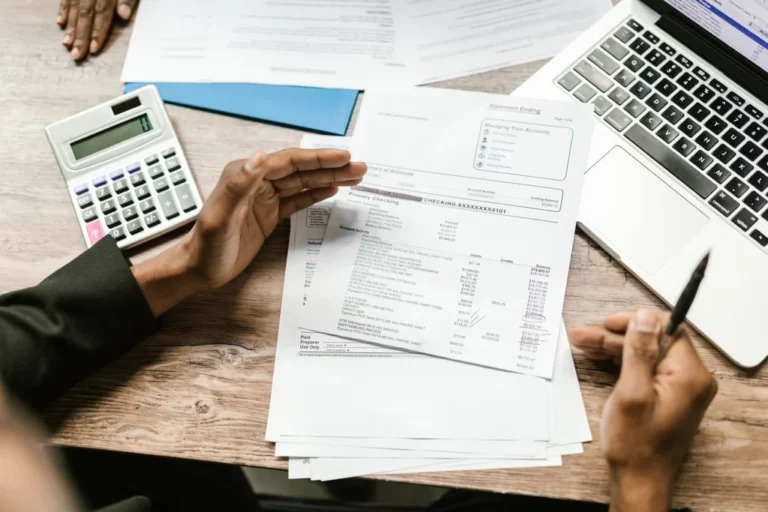
Your monthly statement is the paper trail for your account number. Every FAB statement lists your account number at the top, next to your name and the statement period — and your statements show only part of the number in some views, with the rest masked, exactly as the photo above shows. If you need the full number, use the app or online banking instead of a masked statement view.
- Open the FAB Mobile app or sign in to online banking.
- Go to your account, then to statements.
- Download the latest monthly statement.
- Look at the top of the first page — your account number is printed there.
If you receive paper statements by post, the same number is printed at the top of the first page. Keep old statements somewhere safe: they are the quickest proof of your account number when your phone is lost or the app will not open. Our FAB bank statement guide explains how to download and read a statement in full.
Method 4 — Welcome Email and Letters
When you opened your FAB account, the bank sent you the number in writing. Check the welcome email FAB sent to the email address you registered — it confirms your new account and lists the account number. The same number is in the welcome pack and any account-opening letter the bank posted to you.
Search your inbox for “FAB” and “welcome” or “account opened”. If you opened the account at a branch, the account-opening form you signed also carries the number. If you cannot find the email, check the spam folder before assuming it never arrived — bank emails are filtered there more often than people expect.
Method 5 — Call FAB on 600 52 5500
If you cannot log in and cannot find any paperwork, call the bank. FAB’s customer care line in the UAE is 600 52 5500; from outside the UAE, call +971 2 681 1511.
- Call 600 52 5500 from the mobile number registered with FAB.
- Choose the option for account services.
- Answer the agent’s verification questions — the bank will ask for personal details to confirm you are the account holder.
- Ask the agent for your account number and write it down.
The bank will never give your account number to someone who cannot pass verification, and that is exactly how it should be. FAB also never asks for your PIN, OTP or password by phone, SMS, email or WhatsApp — if a caller asks for any of those, hang up. Genuine FAB calls ask you to confirm your identity, never to hand over a password.
Method 6 — Visit a FAB Branch
A branch visit is the slowest method, but it works when everything else fails — a lost phone, a locked login, and no paperwork at home.
- Take your original Emirates ID to any FAB branch.
- Tell the counter staff you need your account number.
- The staff will verify your identity and give you the number.
Take the ID itself, not a photo of it on your phone. Branch staff cannot hand out account details on a photocopy or a screenshot alone.
Account Number vs Card Number vs IBAN
Three different numbers cause most of the confusion. Keep them apart:
- Account number: identifies your bank account with FAB. This is the number employers and other banks need to pay money into your account. It is shown in the app, in online banking and on your statement.
- Card number: the 16-digit number printed on the front of your debit or credit card. It identifies the card, not the account. Do not give your card number where an account number is asked for — a transfer sent to a card number will not reach your account.
- IBAN: the longer international format of your account details, used for international transfers. It contains your account number inside it, but it is not the same thing — a form that asks for an account number wants the shorter number, not the IBAN.
Your salary also depends on getting this right. If your salary lands on a Ratibi card, there is no bank account number at all — the card is a prepaid salary card issued through your employer under the Wage Protection System, and its balance is checked through the prepaid card portal, not through the app. If your salary goes to a FAB current or savings account, the employer needs your account number. If your salary has not arrived, our salary not received guide explains what to check first.
Why You Need Your Account Number
You will be asked for it more often than you think:
- Receiving money: anyone sending you a transfer needs your account number (and your name as it appears on the account).
- Salary: your employer needs it to pay your salary into the right account.
- Balance check by SMS: texting
BALplus the last four digits of your account number to 2121 returns your balance — but only if you send the last four digits of the account number, not the card. Our FAB balance check by SMS guide explains the exact format. - Direct debits and standing orders: utility and loan payments are set up against the account number.
- Calling the bank: the agent uses it to pull up your account after verifying you.
Keep Your Account Number Safe

Your account number is not as sensitive as your PIN or OTP — you share it with employers and anyone who pays you — but it is still personal banking information. Treat it with care:
- Never post it publicly — not in a social media comment, a public forum post or a marketplace listing.
- Never send it to a stranger who contacts you first. FAB will never ask for your account number by WhatsApp, and a message asking for it is a scam. If you think someone is misusing your account details, report it to FAB at atyourservice@bankfab.com.
- Do not store it in plain text on a shared phone or in a screenshot gallery that backs up to a shared account. Keep it in the app, where it is protected by your login.
- Shred old statements instead of throwing them in the bin — they carry your account number and your transaction history.
Frequently Asked Questions
This is an independent informational guide. We are not affiliated with, endorsed by, or connected to First Abu Dhabi Bank (FAB). Always confirm balances, fees and procedures through FAB’s official channels at bankfab.com or by calling 600 52 5500.